Saturday, November 10, 2012

Chapter 11: Engaging Teachers and Students in Learning and Self-Reflection


Focus Question 2: How can teachers and students use digital portfolios as tools for learning?

A digital portfolio indicates who a teacher is and what that teacher knows.  It is used to display academic achievements and classroom lesson plans.  A teacher should display their teaching philosophy and other experiences on their portfolio.

It is important for a digital portfolio to be continuously updated, and past work be worked on again to show reflection and growth.  It is not simply a scrapbook of the past; it is a growing and evolving work.

A digital portfolio offers ease of access and portability, but it also becomes a disadvantage when introducing it to someone who has little digital skills (this number is becoming fewer though).


Tech Tool 11.1 TaskStream

Task Stream is a very clean and inviting website.  I think they do a poor job at introducing their purpose.  I would have no idea that they were a portfolio-building website until I got to Pricing-benefits to students.  I do not like that it costs $42 a year so I will be avoiding this tool. However, the screenshot in the book looks very clean and much like I would organize my own folders on my computer.


Reflection:
Digital portfolios I think are extremely important for teachers today.  I do not find the idea of creating a heavy 3-ring-binder portfolio very inviting.  It is also very easy to forget where you have things filed, and with the use of an e-portfolio could be easily searched.

Technology tools in democratic classrooms I believe that it is important to have the children feel like they have a say in what they are learning. I believe that they get more excited the more you involve them.  Doing activities like peer editing and self-evaluation allows students to become the teacher and self-reflect.

Student participation systems and clickers are wonderful tools that don’t put the student on the spot.  This tool could help an introverted student who is struggling while engaging kids that are hyper by giving them something hands on to do.  No one loses with this tool because the teacher can address all the questions that weren’t answered right in the moment and not put pressure or embracement on any of the students. 

Friday, November 2, 2012

Chapter 10 Promoting Success for All Students through Technology


Focus Question: What are differentiated instruction (DI) and universal design for learning (UDL)?

Differentiated instruction is an instructional approach that gives students “multiple options for taking in information and making sense of ideas”

Teaching with DI allows teachers to meet the specific needs of students and achieve their maximum interest.  I experienced this with an English teacher of mine who would allow writing assignments to be done in different formats such as essay, poetry, PowerPoint presentations and comparison journals.  My favorite, at the time, was writing poetry, and my final product was more impressive to my teacher and classmates because I cared about what I was doing because it was fun.

Universal design for learning is the application of universal design principles to educational settings. UDL applies recent advances in the understanding of how the brain processes information to the design of curriculum that can accommodate broad student needs.

An example of Universal Design would be a ramp that makes a building wheelchair accessible, yet at the same time it also makes the transition easier on walkers and people loading things into a building.
An example of UDL would be PowerPoint’s used for hearing impaired students can double as reinforcement for “normal” students.


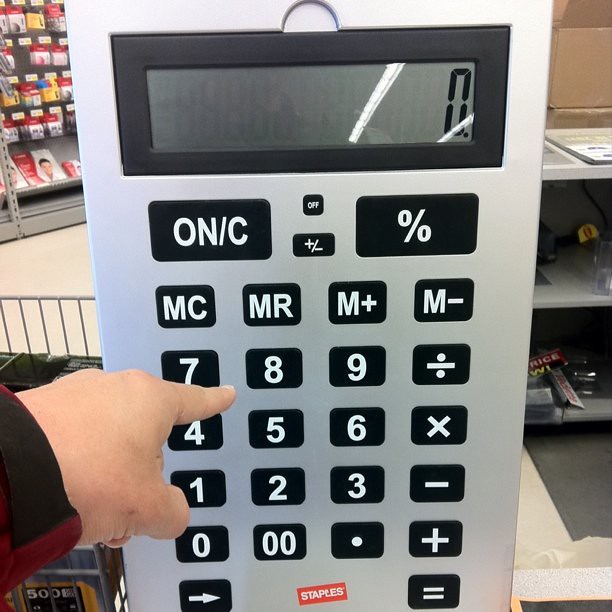
Tech Tool 10.1 Extra-Large and Online Calculators
The Martin Dale Center website was extremely hard to navigate, and hardly seemed to have any organizational purpose.  Clicking through the website I was never sure where it was going to lead me to. Chinese grammar, genome of the honeybee, and Nautical Archaeology are some topics that this site led me to.
Regardless, the point of the tech tool is to point out the usefulness of over-sized calculators.  Which I agree, is a great assistive technology tool for those who are visually impaired or have motor skill problems.  I do not believe that over-sized calculators stimulate conversations about what the word calculate means.  Calculators have a practical use but should not be overused.
By CanadaPenguin on FlickrOkay so this is a hilariously large store display calculator, I don't think calculators get any bigger than this!

Reflection:
Differentiated instruction is important, but I also think it’s important to expose all students to multiple ways of doing things. However, I do not believe that Universal Design for Learning is necessarily a good thing. The accommodations made for students with 504’s are not automatically what is best for regular students.

Calculators are a wonderful technology.  They have allowed us to progress in unimaginable ways just like computers.  However, it is vitally important for students to grasp the manual concepts of math.  They need to be able to critically think about math and not just punch in numbers.  Calculators can be a great tool for checking your work, or speeding along upper level math.  It has no place as a frequently used tool in math.  It is a “sometimes” tool not an “always” tool.

Speech recognition software and text reading software are tools that have helped the visually impaired people of this world out tremendously.  Once again, this is a “sometimes” tool for regular students.  It should not supplement their manual writing and reading practices.  “Too much of a good thing” is absolutely true when it comes to technology and students in some cases.

I can see the advantages and disadvantages of storybooks in a classroom.  I believe the best way to use this tool would be to go over a reading section, check for comprehension, and then use a storybook to reinforce the information learned.  Teachers who use storybooks as the only source of information on any given topic are greatly putting their students at a disadvantage.

All of these tools can be utilized in any classroom, and the technology is welcomed.  As a teacher I’ll need to recognize when these tools are doing harm versus good.  I believe some teachers have crossed the line where their students become dependent on these tools where that need shouldn't be there.

Monday, October 29, 2012

Chapter 9 Alternative Post


One of the main purposes of this VodCast, Digital ID Project A Platform for Learning, Sharing,Remixing and Teaching Digital Citizenship, is to emphasize the use of CIPA (childrens internet protection act).  It continues to explain that a digital citizenship is established with everything that we do on the internet.  We (as adults and as young people using the internet) need to be ever aware of all the content that we put out online.  Once it's out there it's always out there.  This leads to teachers and teaching kids on ethical interment use.  One teacher comments to her students that when writing on the internet you need to say preciously what you mean because people cannot always detect your humor or sarcasm from somewhere else.  It is always extremely important to watch how much information you give and to who.  On the wiki sit Digital-ID, created by teachers for students, they have a funny yet informative video on how worms, bugs, and bots get into our computers.


The VodCast itself seemed a little too broad and didn't focus in on a point.  It was very informative in the sense that it guides you to other sources.  I did not like that they mentioned sites and then didn't link to them in their references.  It made it very difficult or impossible to find.

On the Digital-ID website I also enjoyed this video about evaluating websites. They used the acronym CAPOW (currency, authority, purpose, objectivity, and writing style) to use while evaluating a website.

As a teacher, I will have the responsibility in guiding my students to proper internet use.  This is true for elementary and middle school students (wherever I decide to go).  This VodCast led me to a wonderful website, Digital-ID, that is allowed to be remixed by teachers for their students.  It is full of information, and the videos make learning fun and humorous.

Overall, I enjoyed watching the VodCasts from k12onlineconference.org and watched a couple more than the one I wrote about.  It is full of information that goes way beyond the classroom.  As a teacher it is a necessity to be on top of things and this site provides that service for free! *adds to delicious* 

Sunday, October 14, 2012

Chapter 8 Alternative Post


David Warlick is a blogger, author, and above all a teacher.  In his “about this blog” section, Warlick vividly paints the way for his thought process on education and technology today:
“Many of the barriers that prevent us from modernizing our education systems come from the baggage of outdated notions about teaching, learning, curriculum, our children, and their future.  Asking questions seems to be one way of probing and provoking new perceptions about what we do, why we do it, and how we might adapt within an almost constantly changing environment.
I completely agree with Warlick, and believe that teachers put up barriers with the old way.  He points to the solution of many problems, and that’s simply asking questions.  Asking questions is just as important to teachers as it is for our students.
In Warlick’s blog post titledWhereDo We Go to Measure Success,” he points out the importance of STEM (Science, Technology, Engineer, and Mathematics).  Yet in a graph he created, based on data from Bachelor'sdegrees conferred by degree-granting institutions, he fails to mention the overall increase in degrees received over the years, despite the huge shift in percentage.  “Mathematics and statistics” had one huge drop, in 1970 it was 24k degrees and in 1975 it was 15k degrees to now being 16k degrees… the question isn't what are we doing wrong now but what were we doing right or wrong back then when the data showed the largest decrease.  Overall, the data seems shocking.  Warlick questions, “Is STEM education doing what it’s suppose to do?” in relation to the graph; however, I am asking, will STEM education change these statistics when the children of this generation grow up and graduate college?
To continue with Warlick’s thought process in his blog post I Never Needed to Know That, he stumbled upon a blog post of 10 Things Students Won’t Need to Know WhenThey Graduate.  One thing that this list makes clear, and that Warlick points out, is that there is no way to know or predict what knowledge will be most important to our students for the future.  Some of Warlick’s comments really got me thinking, “How they learn has become much more important,” and “Perhaps the most important thing we can help our children learn, is how to teach themselves.”  I believe these are wise words, and one solution would be to teach children how to synthesize their questions properly with the use of the internet.
Largely, Warlick’s blog is to promote critical thinking among teachers and himself.  It is a personal blog and is based on his personal opinions and views on today’s education.  From what I have read in his posts, Warlick is an innovative teacher that truly wants what is best for the kids and ultimately our society.

Sources:
Bachelor's Degrees Conferred by Degree-granting Institutions, by Field of Study: Selected Years, 1970-71 through 2009-10. Rep. no. 286. Institute of Education Sciences: National Center for Education Statistics, n.d. Web. 14 Oct. 2012.
Dillon, Bob. "10 Things Students Won’t Need To Know When They Graduate." Weblog post. 10 Things Students Won’t Need To Know When They Graduate. Edudemic, 27 Aug. 2012. Web. 14 Oct. 2012.
Warlick, David. "2¢ Worth." Weblog post. 2¢ Worth. N.p., n.d. Web. 14 Oct. 2012. <http://davidwarlick.com/2cents/>.